
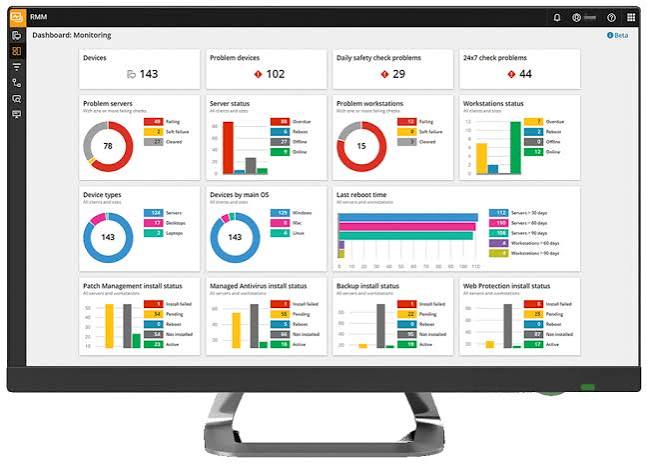
When a business hires an IT company, one of the first questions it should ask is:
“What exactly are you monitoring?”
Because there’s a big difference between an MSP that actively monitors your technology and an IT company that simply waits for something to break.
And this isn’t just an IT issue.
When your technology stops working, your business stops working.
Employees can’t work. Customers may not get answers. Deadlines can be missed. Revenue can be lost. And suddenly, the business owner is spending the day trying to figure out why the internet is down instead of running the company.
That’s why proactive monitoring matters.
IT Problems Are Business Problems
Consider what happens when a critical server starts running out of storage.
Without monitoring, someone may discover the problem when applications stop working.
With proactive monitoring, the MSP can receive an alert when storage reaches a predetermined threshold and address the problem before employees even notice.
That’s the difference between IT support and proactive IT management.
The goal isn’t to know when something breaks.
The goal is to prevent as many things as possible from breaking in the first place.
1. Computers and Servers
Your MSP should continuously monitor computers and servers for signs of trouble, including:
- CPU and memory usage
- Disk space
- Hardware health
- System errors
- Unexpected reboots
- Performance issues
- Server availability
- Critical Windows services
Why does this matter to your business?
A slow or failing computer isn’t just an IT inconvenience.
If an employee spends 20 minutes a day fighting computer problems, that’s more than an hour and a half of lost productivity every week.
Multiply that across 10, 20, or 50 employees and the cost adds up quickly.
Proactive monitoring helps identify these problems before they become productivity problems.
2. Security Threats
Cybersecurity isn’t something a business can afford to check once a month.
Your MSP should be monitoring for:
- Malware and ransomware
- Endpoint security alerts
- Suspicious login activity
- Failed login attempts
- Potentially compromised accounts
- Unauthorized software
- Security configuration problems
Why does this matter to your business?
A cybersecurity incident can cost far more than the price of your IT support.
There can be downtime, lost productivity, data recovery costs, legal expenses, regulatory issues, reputational damage, and potentially lost clients.
And here’s an important distinction:
An alert sitting unread in an IT dashboard isn’t cybersecurity.
Someone needs to review the alert, determine whether it’s legitimate, and take action.
3. Backups
Every business should have reliable backups.
But simply having a backup system isn’t enough.
Your MSP should monitor:
- Whether backups are running
- Whether they complete successfully
- Failed backup jobs
- Available backup storage
- Backup system connectivity
- Recovery points
- Restore capabilities
Why does this matter to your business?
Imagine losing a year’s worth of accounting records, client documents, contracts, or business files.
The question isn’t whether you think you have a backup.
The question is:
“Can we actually recover our data?”
A failed backup can sit unnoticed for weeks or months. By the time someone discovers it, the company may have no usable recovery point.
That’s why backup monitoring is critical.
4. Microsoft 365 and Cloud Services
Moving to the cloud doesn’t mean IT stops monitoring your environment.
For Microsoft 365, your MSP should be paying attention to:
- Suspicious sign-ins
- User accounts
- Multi-factor authentication
- Security alerts
- Mail flow
- License issues
- OneDrive and SharePoint
- Microsoft 365 service health
Why does this matter to your business?
Your employees may depend on Microsoft 365 every minute of the workday.
If an account is compromised, email may be used to launch a phishing attack against your employees, customers, or vendors.
A compromised Microsoft 365 account can also become a gateway to sensitive company information.
Cloud doesn’t eliminate risk. It changes where the risk lives.
5. Network and Internet Connectivity
Your employees may blame their computers when the real problem is your network.
A good MSP should monitor:
- Firewalls
- Switches
- Wireless access points
- Internet connectivity
- VPN connections
- Network performance
- Device availability
Why does this matter to your business?
If your internet goes down, your business may effectively go offline.
Employees can’t access cloud applications. Customers may not be able to reach you. Remote workers can’t connect. Phones and other systems may be affected.
And if nobody is monitoring the network, your employees become the monitoring system.
That’s not a good strategy.
Your employees should be doing their jobs—not diagnosing network problems.
6. Patching and Updates
Outdated software creates unnecessary risk.
Your MSP should monitor whether computers and servers are receiving important updates and identify devices that are falling behind.
Why does this matter to your business?
Security vulnerabilities are routinely discovered in operating systems and applications.
The longer a business leaves vulnerable systems unpatched, the longer it may be exposed.
There are also reliability issues.
And yes, there will always be that one computer that somehow hasn’t been updated since the Obama administration.
A good MSP should know exactly which computer it is.
7. User and Account Activity
Your employees need access to company systems—but that access should be controlled.
Your MSP should monitor important account activity, including:
- New employee accounts
- Disabled accounts
- Departing employees
- Privilege changes
- Administrative accounts
- Suspicious sign-ins
- Authentication issues
Why does this matter to your business?
Employee turnover creates IT risk.
When someone leaves, their access to email, files, cloud applications, VPNs, and other systems should be addressed immediately.
The longer an inactive account remains available, the greater the potential security exposure.
Employee access should change as your workforce changes.
8. The Systems Your Business Actually Depends On
This may be the most important part of MSP monitoring.
Every business is different.
A law firm may depend on document management and secure access to client files.
An accounting firm may depend on tax and accounting applications.
A manufacturing company may depend on specialized software, servers, networking, and internet connectivity.
A professional services firm may rely almost entirely on Microsoft 365 and cloud applications.
Why does this matter?
Your MSP shouldn’t just monitor devices.
They should understand what your business cannot afford to lose.
If your most important business application goes down, how quickly will someone know?
More importantly, what happens next?
Monitoring Saves More Than IT Headaches
This is why proactive monitoring is so important.
You’re not paying an MSP simply to watch computer screens.
You’re paying them to help protect:
Employee productivity.
Every hour employees spend waiting for technology to work is an hour they’re not serving customers or generating revenue.
Revenue.
Downtime can prevent employees from doing billable work, processing orders, serving customers, or completing projects.
Your reputation.
Customers don’t necessarily care why your systems are down. They simply know that you’re unavailable.
Your data.
Business data is one of your company’s most valuable assets. Losing it—or allowing it to be compromised—can have serious consequences.
Your employees’ time.
Your staff shouldn’t become an unpaid IT department.
Your peace of mind.
Business owners have enough to worry about without wondering whether the company’s backups are working or whether someone is monitoring a security alert.
A Good MSP Doesn’t Wait for the Phone to Ring
One of the biggest questions to ask your IT provider is:
“How do you know when something is wrong?”
If the answer is essentially, “Someone calls us,” that’s reactive IT support.
A proactive MSP should often know about a problem before you do.
That’s the value of monitoring.
The objective isn’t to eliminate every IT problem. That’s impossible.
The objective is to identify problems earlier, respond faster, reduce downtime, minimize risk, and prevent small problems from becoming expensive business problems.
Is Your MSP Actually Watching Your Business?
At Data Troop, we believe your IT provider should be proactive—not simply waiting for something to break.
We monitor the systems that keep your business running, identify potential problems, address security risks, and help keep your technology reliable.
Because at the end of the day, we aren’t monitoring computers. We’re helping protect your business.
If you’re not sure what your current IT provider is monitoring—or whether they’re actually doing anything with the information they’re collecting—it’s worth asking.
Data Troop can review your current IT environment and identify the areas that may not be getting the attention they deserve.
Don’t wait for your employees to discover the next IT problem.
Contact Data Troop today and find out what proactive IT management can do for your business.